


Phone Overheating Reasons: How Charging Habits and Battery Health Really Affect Your Phone
Estimated reading time: 8 minutes
Key Takeaways
- Phone overheating reasons are often linked to charging habits, environmental factors, and battery health.
- Understanding charging habits explained can help prevent heat buildup and extend battery life.
- Battery health maintenance involves keeping your phone cool, managing usage, and using proper accessories.
- You can fix overheating during charging by following a step-by-step guide to address common causes.
- Phone battery calibration is an advanced step to correct battery percentage inaccuracies, but it doesn’t repair physical damage.
Table of contents
- Phone Overheating Reasons: How Charging Habits and Battery Health Really Affect Your Phone
- Key Takeaways
- What Your Hot Phone Is Really Telling You
- Main Phone Overheating Reasons (Beyond Just “Using It Too Much”)
- Charging Habits Explained – How Your Behavior Heats Up (or Protects) Your Phone
- Proactive Battery Health Maintenance to Prevent Overheating
- How to Fix Overheating During Charging – Step‑by‑Step Guide
- Advanced Care – Phone Battery Calibration Explained
- Frequently Asked Questions
Your phone feels hot to the touch when you’re scrolling or charging at your desk—a familiar annoyance that signals deeper issues. But a hot phone is more than just annoying; it’s a warning sign that the processor, battery, or environment is being pushed too hard, and repeated overheating can shorten battery life and affect performance, as noted by PhoneCheck and Norton.
Understanding the main phone overheating reasons, especially during charging, is the first step to fixing the problem and protecting long‑term battery health, according to insights from PhoneCheck and Avast. This guide will cover everything from the root causes to practical solutions.
We’ll break down the key phone overheating reasons, get your charging habits explained in plain English, outline essential battery health maintenance steps, provide a step‑by‑step guide to fix overheating during charging, and even touch on phone battery calibration as an advanced care technique.
What Your Hot Phone Is Really Telling You
“Overheating” means your device’s temperature has risen enough to feel uncomfortably hot, trigger warnings, slow down performance, dim the screen, or even cause shutdowns. Phones are designed to operate within a safe temperature range, and when exceeded, the system may throttle performance or display alerts to protect hardware, as explained by PhoneCheck, Norton, and Apple.

Heat is one of the main enemies of lithium‑ion batteries. Frequent high temperatures can permanently reduce battery capacity and overall lifespan, linking directly to battery health maintenance concerns. Sources like PhoneCheck, Norton, and Avast emphasize this connection.
If you care about smoother performance and longer battery life, reducing heat should be a priority. This ties into the broader phone overheating reasons we’ll delve into next, including how to fix overheating during charging.
Main Phone Overheating Reasons (Beyond Just “Using It Too Much”)
Most phone overheating reasons fall into a few main categories, and several get worse during charging. Here’s a breakdown:

Heavy Usage & Multitasking
Running power‑intensive tasks like 3D gaming, video editing, 4K streaming, GPS navigation, or AR/VR makes the CPU and GPU work harder, drawing more power and generating more heat. Sources: PhoneCheck, Norton, Avast, and Bitdefender. Signs include quick heat buildup during games or video calls and fast battery drain.
Poor Ventilation & Trapped Heat
Keeping your phone in tight spaces like under a pillow, in a pocket, or between couch cushions prevents heat from escaping. Thick or rubber cases act as insulation, trapping heat during heavy use or charging. Sources: PhoneCheck, Bitdefender, Asurion, and Norton. Charging on soft surfaces is a common phone overheating reason.
High Environmental Temperature
Hot environments like direct sunlight, car dashboards, or very hot days can push your phone above its safe operating temperature quickly. Apple and other manufacturers warn against leaving phones in hot cars or direct sun. Sources: PhoneCheck, Asurion, Norton, and Apple.
Charging‑Related Overheating
This is a key phone overheating reason and directly links to fix overheating during charging. Factors include:
- Fast charging/high‑wattage adapters produce more heat. Source: PhoneCheck.
- Using the phone heavily while charging stacks processor heat on charging heat. Sources: PhoneCheck and Norton.
- Incompatible or low‑quality chargers/cables cause unstable power delivery. Sources: PhoneCheck and Norton.
- Leaving the phone plugged in long after 100% keeps it warmer. Source: Asurion.
Common scenarios include playing games while fast charging on a bed in summer.
Software or App Glitches
Buggy or poorly optimized apps running in the background can drive constant CPU use and heat. Outdated OS versions may have power‑management bugs. Sources: PhoneCheck, Norton, and Avast.
Battery Issues & Hardware Faults
Aging, damaged, or defective batteries produce more heat and are a major cause of persistent overheating. Faulty internal components or chargers can also be involved. Sources: PhoneCheck, Avast, and Norton. Signs like swelling or burning smell require immediate professional help.
Connectivity & Background Activity
Continuous searching for weak signals, Bluetooth scanning, GPS tracking, and background syncing keep radios and CPU busy, increasing heat. Sources: Asurion and Norton.
Mini‑summary: When overheating happens mostly when charging, likely causes include heavy use while plugged in, fast charging in hot environments, thick cases, incompatible chargers, or aging batteries. This leads us to charging habits explained next.
Charging Habits Explained – How Your Behavior Heats Up (or Protects) Your Phone
Many users blame the phone, but everyday habits are often the real trigger behind overheating during charging and poor battery life. Let’s get your charging habits explained.

Why Lithium‑Ion Batteries Dislike Extremes
Modern phones use lithium‑ion batteries that prefer middle charge ranges. Repeated full discharges and long periods at 100% add stress and reduce capacity over time. For battery health maintenance, aim to keep charge between 20–80% when convenient.
Using the Phone While Charging
Activities like gaming, video calls, or GPS during charging stack CPU/GPU heat on charging heat, a common pattern behind overheating. Sources: PhoneCheck and Norton. Avoid heavy tasks while charging.
Overcharging Tendencies
Modern phones manage charging at 100%, but leaving them plugged in for hours can keep them warmer and contribute to long‑term stress. Source: Asurion. Unplug after full charge or use optimized charging features.
Where and How You Charge
Charging on soft surfaces traps heat—a frequent phone overheating reason. Sources: PhoneCheck, Bitdefender, and Norton. Charging in hot environments adds extra heat. Sources: PhoneCheck, Asurion, and Apple. Always charge on a hard, cool surface away from direct sunlight.
Fast Charging vs. Standard Charging
Fast charging uses higher power, generating more heat. Source: PhoneCheck. Constant use in hot environments can accelerate wear. Turn off fast charging when not needed, and use standard chargers overnight.
Charger and Cable Quality
Faulty, counterfeit, or non‑certified chargers/cables can cause unstable power and excess heat. Sources: PhoneCheck, Norton, and Avast. Prefer original or certified accessories. For essential add‑ons, see this guide to smartphone accessories.
In summary, charging habits explained here directly influence phone overheating reasons and long‑term battery health maintenance.
Proactive Battery Health Maintenance to Prevent Overheating
Most “hot phone” issues can be reduced by focusing on battery health maintenance: keeping heat low, workloads reasonable, and software in good shape.

Keep Your Phone Cool Whenever Possible
Heat is a major factor in battery wear; minimizing it is central to battery health maintenance. Sources: PhoneCheck, Norton, and Avast. Avoid hot cars, direct sun, and soft surfaces while charging. Sources: PhoneCheck, Asurion, and Apple. A simple rule: if it’s too hot for you, it’s too hot for your phone.
Manage Screen Brightness and Workload
High screen brightness increases power draw and heat. Sources: Asurion and Norton. Many heavy apps open at once push CPU/GPU, leading to heat. Sources: PhoneCheck, Norton, and Avast. Use adaptive brightness, reduce brightness indoors, and close unused apps.
Turn Off Radios and Features You’re Not Using
Constant Wi‑Fi, Bluetooth, GPS, etc., can keep radios active and generate heat, especially in poor signal areas. Sources: PhoneCheck, Asurion, and Norton. Turn off features when not needed, and use airplane mode in low‑signal areas.
Keep Software and Apps Updated
Updates often improve power management, fix overheating bugs, and patch security issues. Sources: PhoneCheck and Norton. Enable automatic updates and uninstall unused apps.
Watch for Malware or Rogue Apps
Malware or badly coded apps can keep CPU running at high load, causing constant overheating. Sources: Norton and Bitdefender. Check battery usage stats and scan with security apps. For comprehensive security, see this smartphone security guide.
Know When It’s Time to Replace the Battery
If overheating persists after optimization, an aging battery may be the cause. Sources: PhoneCheck and Avast. Check battery health in settings or seek professional diagnosis. A healthy battery runs cooler, reducing phone overheating reasons.
These battery health maintenance habits lead to fewer overheating episodes and better performance.
How to Fix Overheating During Charging – Step‑by‑Step Guide
Charging is a common phone overheating reason, and this step‑by‑step guide helps you fix overheating during charging while supporting battery health maintenance.
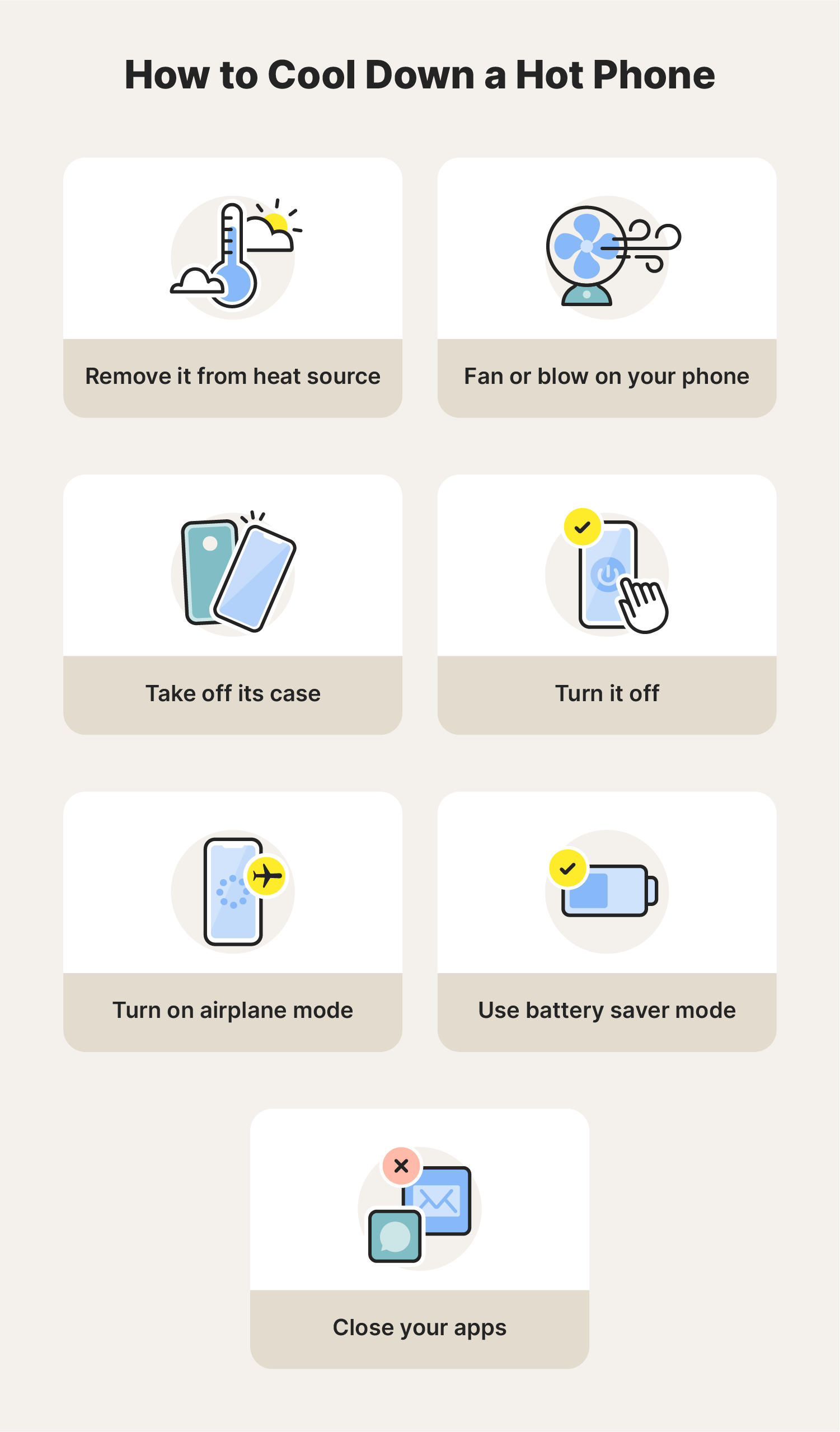
- Stop charging and let the phone cool down safely: Unplug, remove the case, and place on a hard, cool, shaded surface. Sources: PhoneCheck, Asurion, and Norton. Warning: Do not put in fridge or freezer. Sources: Asurion, Norton, and Bitdefender.
- Check the charging environment: Move away from direct sunlight or hot cars. Sources: Asurion, Norton, and Apple. Avoid soft surfaces; use a desk or table. Sources: PhoneCheck and Bitdefender.
- Remove the case while charging: Cases trap heat, especially during charging. Sources: PhoneCheck, Asurion, and Norton.
- Stop heavy use while plugged in: Close games, streaming apps, GPS, etc., and charge with screen off. Sources: PhoneCheck and Norton.
- Test with a different, certified charger and cable: Use original or recommended accessories to isolate the cause. Sources: PhoneCheck, Norton, and Avast.
- Disable fast charging (if available): Turn off fast charging in settings to reduce heat. Source: PhoneCheck.
- Update your phone’s software and apps: Check for OS and app updates to fix bugs. Sources: PhoneCheck and Norton.
- Enable battery saver or low‑power mode while charging: This reduces CPU performance and background activity, lowering heat. Source: Norton.
- Check for misbehaving or malicious apps: Review battery usage stats, force stop or uninstall problematic apps. Sources: Norton and Bitdefender. For productivity tools, see best productivity apps.
- Seek professional diagnosis if overheating continues: Persistent issues may indicate battery or hardware faults. Sources: PhoneCheck and Avast. Contact manufacturer or authorized repair center.

Following these steps helps fix overheating during charging and supports battery health maintenance.
Advanced Care – Phone Battery Calibration Explained
Phone battery calibration aligns the software’s battery percentage estimate with actual behavior; it doesn’t physically repair a worn battery.

What Battery Calibration Is and Why It Matters
The phone uses a “fuel gauge” to estimate charge, which can drift over time, causing percentage jumps or early shutdowns. Calibration refreshes this estimate. Accurate readings help avoid extremes that contribute to heat and stress, aiding battery health maintenance.
When Phone Battery Calibration May Be Useful
- Phone shuts down unexpectedly with high percentage shown.
- Battery percentage jumps suddenly.
- After a major OS update or battery replacement.
- When troubleshooting after ruling out other phone overheating reasons.
Step‑by‑Step Calibration Procedure
Note: Check manufacturer’s guidance first. General steps:
- Back up important data.
- Charge to 100% and leave plugged in for 30–60 minutes extra.
- Use normally until it powers off by itself.
- Leave powered off for 1–2 hours.
- Charge back to 100% in one session, preferably with phone off or idle.
- Turn on and use normally; the system now has a refreshed range.
Caution: Do this only occasionally, as frequent full discharges harm battery health maintenance.
When Calibration Is Not the Answer
If overheating and poor battery life persist after calibration and habit adjustments, the issue is likely genuine battery wear or hardware problems, not inaccurate readings. In such cases, replacement or professional help is needed.
To bring it all together, most phone overheating reasons stem from heavy processing, poor ventilation, hot environments, and charging‑related heat. Sources: PhoneCheck, Asurion, Norton, and Avast. Everyday charging habits explained—like using the phone while charging or on soft surfaces—directly influence overheating and battery wear. Sources: PhoneCheck and Asurion. Thoughtful battery health maintenance—keeping the phone cool, managing usage, and updating software—reduces heat and preserves capacity. For devices with excellent battery life, see top smartphones with long battery life. When overheating occurs during charging, the step‑by‑step guide makes it easier to fix overheating during charging. Phone battery calibration corrects inaccurate readings but doesn’t reverse physical wear.

Start with small changes today, like charging on a hard surface or avoiding heavy use while plugged in. Treat your phone as a long‑term investment where managing heat and habits pays off. For upgrade considerations, check latest smartphone releases.

Frequently Asked Questions
Why does my phone overheat only when charging?
This is often due to combined heat from charging and usage, poor ventilation, or incompatible chargers. Refer to the fix overheating during charging guide for steps.
Can overheating damage my phone permanently?
Yes, frequent overheating can shorten battery lifespan and affect performance, as noted in battery health maintenance sources like PhoneCheck and Norton.
How can I improve my charging habits?
Get your charging habits explained in the dedicated section: avoid heavy use while charging, use certified accessories, charge on hard surfaces, and disable fast charging when not needed.
Is phone battery calibration necessary?
It’s useful for correcting inaccurate battery readings, but not for fixing physical battery issues. See the phone battery calibration section for details.
What should I do if my phone overheats frequently?
Follow the fix overheating during charging steps, and if problems persist, seek professional diagnosis to check for battery or hardware faults.