

Zigbee vs Z-Wave vs Wi-Fi: Your Smart Home Connectivity Decision Made Easy
Estimated reading time: 10 minutes
Key Takeaways
- Understanding zigbee vs zwave vs wifi is the first step to a frustration-free smart home.
- Wi-Fi is best for high-bandwidth devices (cameras, speakers) but can strain your router and drain batteries fast.
- Zigbee excels at creating large, dense networks of low-power devices like bulbs and sensors.
- Z-Wave prioritizes reliability and low interference, making it a top choice for security devices and locks.
- Most advanced systems use a hybrid approach, managed by a hub with strong smart hub compatibility.
Table of contents
- Zigbee vs Z-Wave vs Wi-Fi: Your Smart Home Connectivity Decision Made Easy
- Key Takeaways
- Smart Home Connectivity Explained – Why Standards Matter
- Head‑to‑Head Comparison – Zigbee vs Z-Wave vs Wi-Fi
- Building Your System – Compatibility and Hubs
- Practical Implementation – Device Pairing Guide
- Choosing the Right Protocol for Your Needs
- Frequently Asked Questions
You excitedly unbox your new smart bulb, lock, and motion sensor. They’re all “smart,” so they should work together seamlessly, right? Cue the frustrating discovery: they don’t. The reason? Even though everything is wireless, not all smart devices speak the same wireless “language.”
This is where your first—and most important—smart home decision comes in: choosing how your devices talk to each other. In other words, understanding the battle of zigbee vs zwave vs wifi. These are the three main home automation standards that form the backbone of your smart home.

Smart home connectivity simply refers to the way your devices (lights, locks, sensors, cameras) connect wirelessly to each other and to a central controller or app. Most rely on one of three systems: Zigbee, Z-Wave, or your familiar home Wi‑Fi [1][2].
This guide will give you smart home connectivity explained in plain language. We’ll compare zigbee vs zwave vs wifi on range, power, reliability, and cost, and show you how to pick the right mix. We’ll also include a practical device pairing guide and crucial tips on smart hub compatibility so you never buy a device that won’t work with your system. If you’re just getting started with smart homes, our beginner’s guide is a great place to begin.
Smart Home Connectivity Explained – Why Standards Matter
Before diving into the specifics of zigbee vs zwave vs wifi, let’s understand what we’re really comparing. These are all wireless communication protocols.
What is a Wireless Communication Protocol?
Think of a protocol as the “language” and “rules of conversation” for devices. It’s the set of rules, frequencies, and message formats they use to send information without wires. For smart homes, the chosen protocol dictates critical factors [1][2]:
- Range & Coverage: How far the signal can travel.
- Power Consumption: How much energy devices use, affecting battery life.
- Data Rate (Bandwidth): How much information can be sent, and how fast.
- Network Capacity: How many devices can join the same network.
Why Multiple Home Automation Standards Exist
Different priorities led to different home automation standards. Wi‑Fi was built for high-speed internet, prioritizing high bandwidth for video and audio, but at the cost of higher power use [1][2]. Zigbee and Z‑Wave were designed specifically for the Internet of Things (IoT), favoring low power consumption and reliability over raw speed, making them perfect for sensors and locks that send small data packets [1][3][4].
The core trade-offs are:
- Speed vs. Battery Life: Wi‑Fi is fast but drains batteries; Zigbee/Z‑Wave are slower but can let sensors last for years [1].
- Range vs. Interference: Lower frequencies (like Z‑Wave’s) travel farther through walls. Higher frequencies (2.4 GHz) carry more data but face more congestion [1][3].
- Simplicity vs. Robustness: Wi‑Fi devices connect directly to your router—simple to start. Zigbee/Z‑Wave typically need a hub, adding upfront complexity but creating a more robust, efficient network [2].
Meet the Big Three Protocols
Wi‑Fi: The ubiquitous technology connecting computers and phones to the internet. Many data-heavy smart devices like cameras and speakers use it because they need its high bandwidth [1][2].
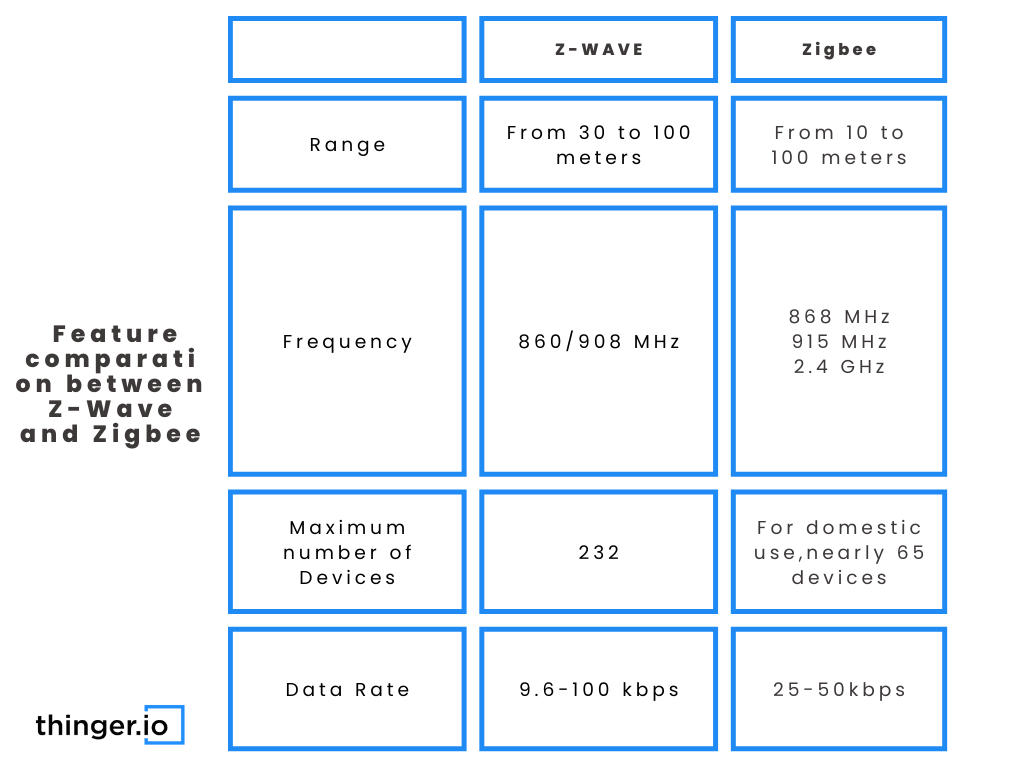
Zigbee: A low-power, short-range mesh networking protocol designed for connecting many small devices like bulbs and sensors. It uses the 2.4 GHz band and can support a theoretical 65,000+ devices on one network [5][1][4].
Z‑Wave: A low-power, sub‑GHz mesh networking protocol built for home automation, emphasizing reliability. Running around 800–900 MHz, it avoids Wi‑Fi interference and has better wall penetration. A Z‑Wave network supports up to 232 devices [5][1][3].
Head‑to‑Head Comparison – Zigbee vs Z-Wave vs Wi-Fi
Let’s break down zigbee vs zwave vs wifi across the key features that matter for your home.
Comparison Table
| Feature | Zigbee | Z-Wave | Wi-Fi |
|---|---|---|---|
| Network Type | Mesh | Mesh | Star (Router-Centric) |
| Frequency | 2.4 GHz | ~800-900 MHz (Sub-GHz) | 2.4 GHz & 5 GHz |
| Interference | High (shares crowded 2.4 GHz band) | Low (avoids Wi-Fi congestion) | Medium (can be crowded) |
| Power Use | Very Low (years on battery) | Very Low (years on battery) | High (poor for small batteries) |
| Range per Hop | 10-30m indoors | 30-100m indoors | Varies by router & layout |
| Max Devices | ~65,000 | 232 | Router-dependent |
| Data Rate | Low-Moderate | Low | High |
| Hub Needed? | Typically, yes | Yes | No (connects to router) |
| Best Use Cases | Bulbs, sensors, switches | Locks, security sensors | Cameras, speakers, streaming |

Technology & Network Type – Mesh vs Router‑Centric
Zigbee and Z-Wave use mesh networking. Here, devices (especially mains-powered ones like plugs and bulbs) act as repeaters, relaying signals for each other. This extends coverage and adds redundancy—if one path fails, the message finds another [5][1].

Standard Wi-Fi is a router-centric (star) network. Each device talks directly to the router. Devices don’t help each other communicate unless you buy a separate mesh Wi-Fi system. This can put a heavy load on your router [2].
Frequency & Interference
Zigbee’s 2.4 GHz band overlaps with Wi-Fi and Bluetooth, which can cause interference. Careful channel selection can help [5][3]. Z‑Wave’s sub‑GHz operation generally avoids this crowded space, offering more reliable connections through walls [5][1].
Power Consumption & Battery Life
This is a major differentiator. Zigbee and Z‑Wave are engineered for extreme efficiency. Battery devices can “sleep” and wake briefly, enabling years of battery life for sensors [5][3]. Wi‑Fi radios stay more active, draining small batteries quickly, making Wi‑Fi best for plugged-in devices [1][2].

Range & Mesh Capabilities
While an individual Zigbee device has moderate range, its mesh strength comes from having many repeating nodes. Z‑Wave offers longer distance per hop, so you might need fewer devices to cover a large house [5][3]. Wi‑Fi range depends entirely on your router; edge-of-coverage devices may become unreliable.
Data Speed & Bandwidth
Wi‑Fi’s high throughput is necessary for streaming camera video or music. Zigbee and Z‑Wave are slower by design, but this is more than enough for simple “on/off” or “motion detected” messages [1][3].
Cost & Availability
Wi‑Fi devices are ubiquitous and often inexpensive, but the ecosystem is fragmented across many apps. Zigbee is widely used by ecosystems like Philips Hue and some Amazon Echo models, offering broad availability [1][4]. Z‑Wave is strong in security-focused systems; its catalog is smaller but devices are designed for close interoperability [5][3].
Building Your System – Compatibility and Hubs
What a Smart Hub Does
A smart hub is the brain of your smart home. It manages and coordinates devices across different protocols, acting as a translator. It provides a single app for control and can run automations locally (without the cloud), improving speed, reliability, and privacy [6][2].
Popular Hub Options and Smart Hub Compatibility
Smart hub compatibility means a hub can both “speak” a device’s protocol (Zigbee/Z‑Wave) and integrate with its brand. Popular options include:
- Samsung SmartThings: Supports Zigbee, Z‑Wave, and integrates Wi‑Fi devices.
- Hubitat Elevation: Focuses on local processing with built-in Zigbee & Z‑Wave.
- Home Assistant: An open-source platform that can add protocol support via USB dongles for massive flexibility [7][6].
The No‑Hub, Wi‑Fi‑Only Approach
Pros: Simple start; no extra box. Cons: Dozens of Wi‑Fi devices can slow your router; you’ll face app fragmentation; and most devices rely on cloud servers, breaking automations if your internet drops [2].
How to Choose the Right Hub (or Platform)
- List your devices: Note which protocol each uses. Our guide to must-have smart home devices can help you build that list.
- Decide on local control: How important is it for lights/locks to work without internet?
- Plan for growth: If adding many sensors/lights, prioritize Zigbee/Z‑Wave support.
- Seek flexibility: For future-proofing, choose a hub that supports multiple protocols [7][6].
Practical Implementation – Device Pairing Guide
This device pairing guide walks you through adding devices to your network. Proper pairing ensures reliability and security.
General Pairing Flow (Applies to All Protocols)
- Open your hub/app and select Add or Pair a new device.
- Put the hub into pairing/inclusion mode (often time-limited).
- Put the device into pairing mode (usually via a button press).
- Wait for discovery, then name the device and assign it to a room.
- Test basic functions.
Zigbee Pairing Basics
Choose “Add Zigbee device” in your hub. Pair new devices close to the hub first, then move them to their final location. Remember, mains-powered Zigbee devices like plugs and bulbs act as repeaters to strengthen your mesh [5][1].

Z-Wave Pairing Basics
Use “Add Z‑Wave device.” Critical: If a device was ever paired before, you must exclude it first from any Z‑Wave hub. Pair battery devices near the hub initially [5][1][3].
Wi-Fi Device Pairing Basics
You’ll typically use the vendor’s app, connect to the device’s temporary network, and enter your home Wi‑Fi details. Important: Many smart devices only work on 2.4 GHz networks, so ensure your phone is on that band during setup [2].
Common Pairing Problems and Fixes
- Device not discovered? Confirm pairing mode; move closer; power cycle device & hub.
- Unreliable after joining? For Zigbee/Z‑Wave, add repeaters. For Wi‑Fi, improve signal strength or change router channels.
Secure Pairing Practices
Security is crucial for devices controlling entry or tracking presence. Use strong, unique Wi‑Fi passwords, keep hub and app firmware updated, and prefer local control where possible to reduce cloud dependence [5][1][3].
Choosing the Right Protocol for Your Needs
There’s no single winner in zigbee vs zwave vs wifi. The best choice depends on your devices and goals. Many successful setups use a hybrid strategy.
When Wi‑Fi Makes the Most Sense
Ideal for small setups or high-bandwidth devices like cameras, video doorbells, and smart speakers. It’s also for those who want to avoid a dedicated hub, accepting potential router load and app fragmentation [1][2].
When Zigbee is the Better Fit
Perfect for building a large network of low-power devices: bulbs, plugs, sensors. Also great if you’re already in the Philips Hue or certain Amazon Echo ecosystems. Its global 2.4 GHz band makes it easy to use worldwide [5][4][1].
When Z‑Wave Shines
The go-to for reliability and low interference, especially in Wi‑Fi-congested areas. Its strong suit is security-focused setups with door locks, sensors, and sirens. It also boasts strong cross-brand interoperability [5][1][3].
Hybrid / Multi‑Protocol Strategy
This “best of all worlds” approach is common: Wi‑Fi for cameras/media, Zigbee for lighting/sensors, and Z‑Wave for critical security devices. A multi-protocol hub integrates everything, giving you maximum flexibility [7][2][6].
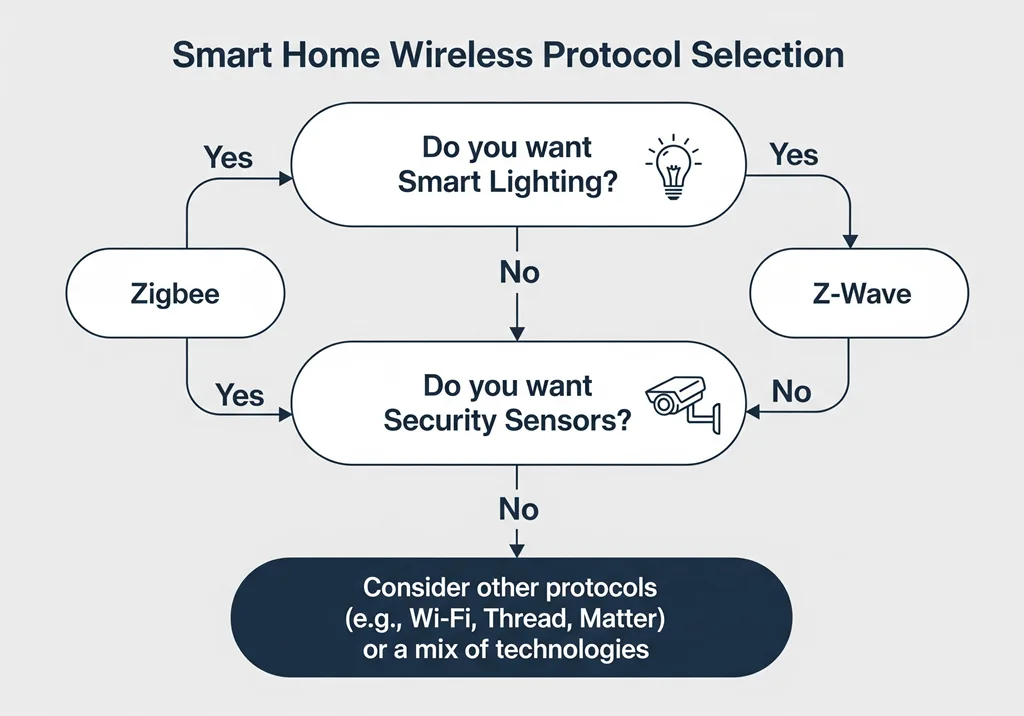
A simple decision framework:
- Video/Continuous Data? → Prefer Wi‑Fi.
- Many Small Battery Sensors/Bulbs? → Prefer Zigbee.
- Lock or Critical Sensor in Noisy Environment? → Consider Z‑Wave.
The right choice in zigbee vs zwave vs wifi depends on your device types, home size, and need for reliability [1]. In summary: Wi‑Fi is best for a few high-bandwidth devices; Zigbee for dense networks of lights and sensors; Z‑Wave for reliable, low-interference control and security [5][2].
Start by choosing a hub or platform with good smart hub compatibility across multiple home automation standards [6]. Explore our guide to the best smart home devices for 2025 to inform your choices. Map out one room or routine you want to automate, use this guide to pick the right protocol mix, and build a system that feels seamless. To dive deeper into how AI is shaping the future, check out our article on AI-powered smart home trends. For more on the history and evolution of these technologies, you might enjoy reading about the evolution of smart home technology.
Frequently Asked Questions
1. Can Zigbee, Z-Wave, and Wi-Fi devices work together?
Yes, but not directly. They need a central translator. A multi-protocol smart hub (like Samsung SmartThings, Hubitat, or Home Assistant) can communicate with devices on each standard and let them interact through automations in a single app.
2. Do I need a separate hub for Zigbee and Z-Wave?
Not necessarily. Many hubs on the market have both Zigbee and Z‑Wave radios built into a single unit. Always check the hub’s specifications to confirm which protocols it supports natively.
3. Is Z-Wave really better than Zigbee?
“Better” depends on your environment. Z‑Wave generally has better range per hop and less interference because it uses a different frequency. Zigbee can support more devices and is often less expensive. For most users, both are excellent, reliable choices for low-power devices.
4. Will adding lots of Wi-Fi smart devices slow down my internet?
It can congest your home network and potentially slow down other activities, especially on an older or basic router. Each device is a connected client. For large setups, a robust router or a dedicated Wi‑Fi mesh system is recommended, or better yet, offload low-power devices to Zigbee/Z‑Wave.
5. What is the new “Matter” standard, and should I wait for it?
Matter is a new, unified smart home standard backed by Apple, Google, Amazon, and others. It aims to fix compatibility issues. It’s promising, but the existing ecosystem of Zigbee, Z‑Wave, and Wi‑Fi devices is vast and will be supported for years. You don’t need to wait, but when buying new devices, looking for “Matter-over-Thread” or “Matter-over-Wi-Fi” labels can offer future-proofing.