The Best AI Coding Assistants in 2025: A Developer’s Guide to Comparing Tools
Estimated reading time: 8 minutes

Key Takeaways
- AI coding assistants are essential tools in the modern development workflow, not just novelty features.
- GitHub Copilot is the most famous option, but the market now offers powerful alternatives for different needs and budgets.
- Key factors to compare coding tools include cost, data privacy, language support, and security features.
- Tabnine, Codeium, Amazon CodeWhisperer, Cursor, and GitLab Duo are top GitHub Copilot alternatives each with unique strengths.
- Choosing the right programming AI depends on your specific role, team size, security requirements, and ecosystem.
Table of contents
- The Best AI Coding Assistants in 2025: A Developer’s Guide to Comparing Tools
- The Rise of Programming AI: Why You Need to Compare
- Why Look Beyond the Default? (The Comparison Trigger)
- Deep Dive: Key GitHub Copilot Alternatives
- Evaluating Developer Productivity AI: Your Comparison Checklist
- Practical Comparison Scenarios
- Final Verdict and Recommendations
- Conclusion: Maximizing Developer Productivity with the Right AI
- Frequently Asked Questions
Introduction
In today’s fast-paced development landscape, AI coding assistants have shifted from a “nice-to-have” to an essential component of the modern workflow. While GitHub Copilot is the most famous tool in this space, the market has matured considerably, offering a range of powerful alternatives. This article’s core mission is to help developers objectively compare coding tools to find the best fit for their specific needs, moving beyond just the default option. We will cover key GitHub Copilot alternatives, evaluate developer productivity AI, and look at the best code generation tools and programming AI for different scenarios.
The Rise of Programming AI: Why You Need to Compare
Developer productivity AI is no longer a future concept but a present-day necessity. As the tools mature, the question has shifted from “Should I use a programming AI?” to “Which programming AI maximizes my productivity?”
A groundbreaking 2023 study by GitHub and Microsoft found that developers using Copilot completed tasks 55% faster than those who did not. You can read the full study on the GitHub blog. Similarly, Tabnine claims their tool helps reduce boilerplate code by up to 30%, as detailed on their official blog. Amazon CodeWhisperer is said to reduce context switches by 20%, a figure reported in the AWS developer guide. These statistics underscore that programming AI is no longer an experiment; it is a proven productivity multiplier. For a broader look at how AI is transforming various fields, check out our overview on 10 cutting-edge AI technologies shaping the future.
Why Look Beyond the Default? (The Comparison Trigger)
To satisfy the “informational – compare” search intent, it is important to address the pain points that make developers compare coding tools. Here are four key reasons why GitHub Copilot alternatives are worth considering.
1. Cost: GitHub Copilot costs $10 to $39 per month, while alternatives like Codeium offer a free tier for individuals. This pricing difference alone can be a deciding factor for solo developers and small teams. For context on the broader Copilot ecosystem, you can read about Microsoft Copilot debuts Android app.
2. Data Privacy: Many enterprises cannot send proprietary code to a cloud-hosted model due to security and compliance policies. This concern drives interest in local-first GitHub Copilot alternatives like Tabnine Enterprise. A real-world example of privacy risks with AI tools is highlighted in our article on WhatsApp AI mistakenly shares phone number, underscoring the importance of secure solutions.
3. Language and Framework Support: While Copilot excels in popular languages like Python and JavaScript, alternatives like Codeium offer superior support for niche languages such as R, Fortran, and Scala.
4. Feature Gaps: Copilot does not include built-in security scanning. In contrast, tools like Amazon CodeWhisperer provide inline vulnerability detection (SAST), which can catch issues like OWASP Top 10 vulnerabilities directly within the IDE.
These specific pain points are the driving force behind the growing search for GitHub Copilot alternatives.
Deep Dive: Key GitHub Copilot Alternatives
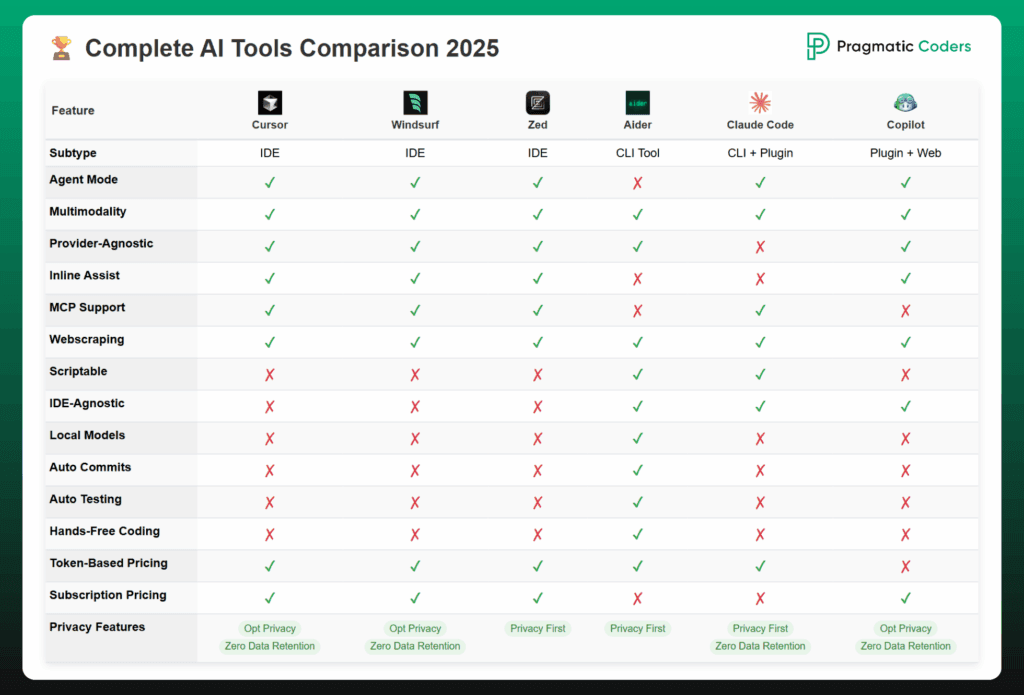
Let’s compare the top code generation tools on the market. Each tool below is a leader among AI coding assistants, and understanding their strengths and weaknesses is critical for making the right choice.
Tool 1: Tabnine
Tabnine is a leading AI coding assistant for privacy-conscious teams. Its hybrid local/cloud model allows code to be processed on-device, with additional cloud-based completions when needed. It supports 90+ languages and is known for its deep integration with local coding conventions. More details can be found on the Tabnine documentation site.
Tool 2: Codeium
Codeium is positioned as the best free code generation tool for individuals. It offers unlimited completions and low latency of less than 200ms. Its free tier is a major differentiator for budgets. Learn more on the Codeium pricing page.
Tool 3: Amazon CodeWhisperer
Amazon CodeWhisperer is the go-to choice for developers in the AWS ecosystem. It features inline security scanning (SAST) that detects OWASP Top 10 vulnerabilities. It is completely free for individual use. Full details are on the AWS developer guide for CodeWhisperer.
Tool 4: Cursor
Cursor is not just an AI coding assistant; it is a new IDE built from the ground up with AI. It excels in multi-file editing and refactoring with AI-powered diff panels. Explore its capabilities on the Cursor FAQ page.
Tool 5: GitLab Duo Code Suggestions
GitLab Duo is the best choice for GitLab-native DevSecOps teams. It integrates deeply with GitLab pipelines and merge requests, though its language support is more limited compared to other tools. Check out the GitLab pricing page for more information.
After this comparison, you’ll need a method to evaluate these options, which we cover next.

Evaluating Developer Productivity AI: Your Comparison Checklist
To truly compare coding tools, you must use objective criteria. Here is a checklist to help you evaluate developer productivity AI options effectively.
1. Accuracy and Context Awareness: Some tools are better at understanding project-specific conventions. Research, including a study from IEEE, shows that Tabnine excels in maintaining local conventions, while Copilot leverages broader training data for more general suggestions. For a deeper dive into how context works with AI, read our explanation of the Model Context Protocol (MCP).
2. IDE Support: The best AI coding assistants work across multiple IDEs. Codeium leads in breadth, supporting VS Code, JetBrains, Neovim, and more. See the Codeium integrations page.
3. Latency: Low latency is crucial for maintaining flow state. Codeium claims an average of less than 200ms. Copilot and Tabnine Enterprise offer similar performance. Refer to Codeium performance benchmarks for data.
4. Security and Compliance: Built-in security scanning (like CodeWhisperer’s SAST) and on-premise deployment (like Tabnine Enterprise) are essential for regulated industries. See the AWS SAST documentation and Tabnine Enterprise compliance page.
5. Cost vs. Value: Always calculate the total cost per active developer, not just the list price. Compare pricing on each tool’s official site.

Practical Comparison Scenarios
Let’s see how each AI coding assistant performs on real-world tasks. This hands-on analysis helps demonstrate the capabilities of these code generation tools.
Scenario 1: Generating a Function (Python – “sort a list of dicts by a key”)
- Copilot: Suggests using
sorted()with a lambda function quickly. - Tabnine: Provides a similar solution but often prioritizes local project conventions.
- Codeium: Offers completions with multiple sorting examples.
- Amazon CodeWhisperer: Suggests the function and flags that
sorted()does not mutate the original list, preventing a common bug. This security check is highlighted in the AWS CodeWhisperer security scanning documentation. - Cursor: Generates the function quickly with AI-powered inline suggestions.
Scenario 2: Refactoring Code (JavaScript – Callback Hell to Async/Await)
- Copilot: Can refactor a single function from callbacks to promises or async/await.
- Codeium: Has a dedicated “refactor” command for more complex changes.
- Cursor: Is best-in-class for this use case, using a diff panel to show AI-propsoed refactors across multiple files. Details are on the Cursor blog on refactoring.
Scenario 3: Writing Unit Tests (TypeScript with Jest)
- Copilot: Quickly generates tests for standalone functions.
- Tabnine: Has 15% higher test-generation accuracy compared to Copilot, based on an IEEE paper titled “Evaluating AI Code Generators” (2024).
- CodeWhisperer: Generates tests with attention to edge cases and mock objects.
Final Verdict and Recommendations
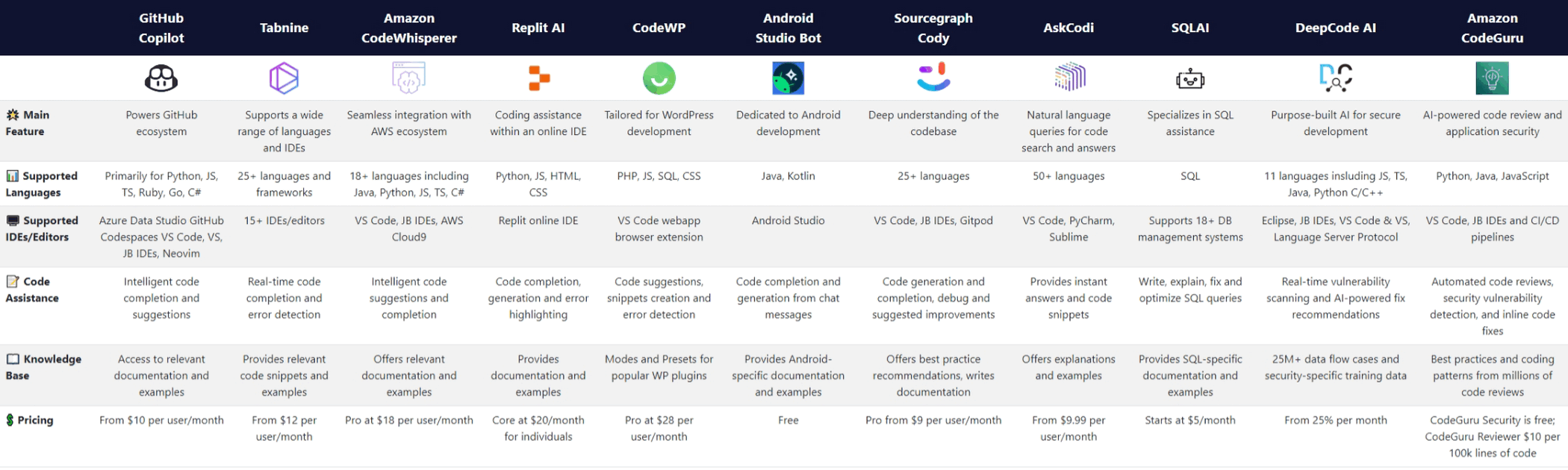
Based on our analysis, here is a decision matrix to help you choose among these GitHub Copilot alternatives and find the right programming AI for your situation.
- Solo Developer: Choose Codeium for its unlimited free tier and excellent general performance.
- Enterprise Team: Select Tabnine Enterprise for its on-premise deployment, data privacy, and compliance features.
- AWS-Centric Team: Go with Amazon CodeWhisperer for its seamless integration with AWS services and built-in security scanning.
- Open Source Maintainer: Use Copilot (free for OSS) or Codeium for robust code generation without cost.
- DevOps Organization: Pick GitLab Duo Code Suggestions for its deep integration with GitLab pipelines and the DevSecOps lifecycle.
The best choice always depends on the trade-off between security, cost, and ecosystem requirements.
Conclusion: Maximizing Developer Productivity with the Right AI
We reiterate that developer productivity gains are not just about typing speed, but about reduced context switching and fewer errors. By carefully comparing GitHub Copilot alternatives, developers can turn a programming AI from a gimmick into a genuine multiplier. For further reading on how to leverage AI for productivity, check out our guide on 5 ways to use AI strategies to boost productivity.
Which AI coding assistant did you choose? Share your thoughts in the comments or start a discussion on our forum.
This article was researched using official documentation, peer-reviewed studies (including the IEEE paper “Evaluating AI Code Generators” from 2024), and community reports as of Q2 2025. For a general reference, you can visit our homepage for more updates.

Frequently Asked Questions
- What is the best free AI coding assistant for individuals?
Codeium is widely considered the best free option, offering unlimited completions and low latency. Amazon CodeWhisperer is another strong free choice for AWS developers. - How does Amazon CodeWhisperer differ from GitHub Copilot?
CodeWhisperer includes built-in security scanning (SAST) that can detect OWASP Top 10 vulnerabilities, which Copilot lacks. It is also optimized for the AWS ecosystem and is free for individuals. - What should I consider when comparing coding tools?
Focus on five key criteria: accuracy and context awareness, IDE support, latency, security and compliance features, and cost versus value. - Why might a developer choose Tabnine over GitHub Copilot?
Tabnine is preferred for its on-premise deployment option, which addresses data privacy concerns for enterprises. It also excels at maintaining local coding conventions. - Is Cursor better than traditional AI coding assistants?
Cursor is unique because it is a new IDE, not just a plugin. It is better for multi-file refactoring and offers AI-powered diff panels. It is ideal for developers who want a fully AI-integrated environment.