
JSON Schema Explained: The Complete Guide to JSON Validation and Schema Definition
Estimated reading time: 8 minutes
Key Takeaways
- Dealing with unvalidated JSON data in applications often leads to frustrating errors, including missing fields, incorrect data types, and inconsistencies.
- JSON Schema is a standardized, JSON-based vocabulary for describing the structure and constraints of JSON data, serving as a powerful tool for data validation.
- It’s not a programming language but a specification that annotates and validates JSON documents, ensuring they conform to predefined rules and acting as a single source of truth for data contracts.
- JSON Schema defines structure, constraints (data types, ranges, patterns, mandatory fields), and documentation, leading to consistency, predictability, and error prevention.
- Understanding core concepts like basic schema structure, types, properties, required fields, common constraints, arrays, and references (`$ref`) is crucial for effective use.
- It plays a vital role in API schema design, configuration file validation, message queue payloads, and general data interchange.
- Popular tools and libraries exist across various programming languages to facilitate JSON Schema validation, making implementation straightforward.
- Implementing JSON Schema is essential for robust applications, saving development time and reducing bugs caused by data inconsistencies.
Table of contents
Ever found yourself staring at a cascade of cryptic error messages, only to discover the root cause was a single misplaced comma or an unexpected data type in a JSON payload? If you’ve developed applications that handle data, chances are you’ve encountered the frustrations of dealing with *unvalidated JSON data*. Missing fields can break your application logic, incorrect data types can lead to silent corruption, and inconsistencies between your front-end and back-end systems can become a nightmare to debug. This is especially challenging in the realm of API schema development and maintenance, where clear data contracts are paramount for seamless integration.
Fortunately, there’s a standardized solution that brings order to this potential chaos: JSON Schema.
“JSON Schema is a JSON-based language for describing the structure and constraints of JSON data so that it can be consistently validated and documented.” (Source: apidog.com)
“JSON Schema is a powerful tool that allows you to describe the structure, content, and semantic meaning of your JSON data.” (Source: json-schema.org)
In this comprehensive guide, we’ll demystify JSON Schema. You’ll learn how to read and write basic schema definitions, implement robust data validation, and understand its critical role in modern API schema design. Get ready to make your JSON data predictable, reliable, and machine-checkable.
What is JSON Schema?
At its core, JSON Schema is not a programming language. Instead, it’s a specification or vocabulary written in JSON itself. Its primary purpose is to annotate and validate JSON documents. Think of it as a blueprint or a contract that defines what a valid JSON document should look like.
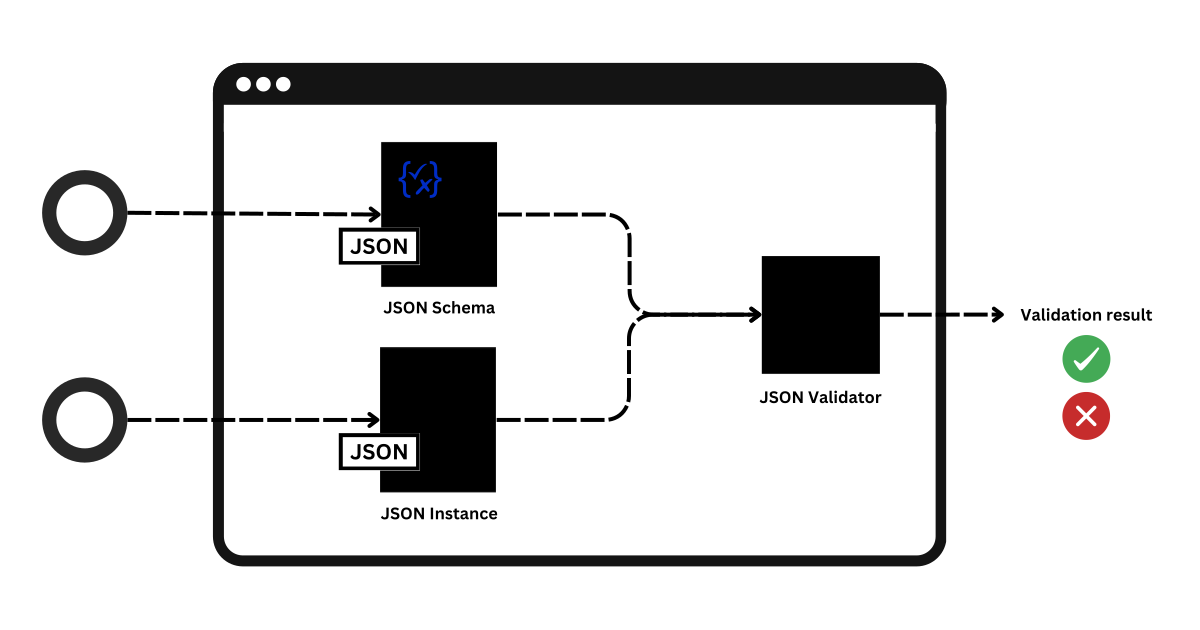
The main goal of JSON Schema is to make JSON data machine-checkable. This means that before your application uses a piece of JSON data, it can be automatically verified against a schema to ensure it meets specific requirements. This also establishes a single source of truth for data contracts, which is invaluable when multiple services or components need to communicate.
“It allows you to describe the expected structure of JSON data, including data types, required fields, and other constraints.” (Source: apidog.com)
“JSON Schema is used to describe the structure and constraints of JSON documents.” (Source: json-schema.org)
With JSON Schema, you can meticulously describe various aspects of your JSON data:
- Structure: Define how data is organized, including nested objects, arrays, and their relationships. (Source: apidog.com, json-schema.org)
- Constraints: Specify rules for data content, such as required data types (string, number, boolean), numerical ranges, string patterns (using regular expressions), and mandatory fields. (Source: json-schema.org, betterjsonviewer.com)
- Documentation: Include human-readable information using keywords like
titleanddescriptionto explain the purpose and meaning of the schema and its parts. (Source: json-schema.org)
The benefits of adopting JSON Schema are significant:
- Ensures consistency across different services and applications, making your data predictable. This consistency is a cornerstone of reliable system integration.
- Provides clear predictability regarding the shape and content of data exchanged, reducing guesswork.
- Facilitates error prevention and simplifies debugging by catching invalid data at the earliest possible moment. (Source: apidog.com, json-schema.org)
In essence, JSON Schema elevates your data handling from reactive error fixing to proactive data integrity.
Why is JSON Validation Important?
The importance of validating JSON data cannot be overstated. Without a structured approach to validation, applications can become fragile and prone to unexpected failures. Let’s explore the common pitfalls of working with unvalidated JSON:
- Runtime Errors: This is perhaps the most immediate and visible consequence. Imagine your application expecting an integer for a user’s age but receiving a string or `null`. This can lead to crashes, unexpected behavior, and a poor user experience. Dealing with these kinds of runtime errors can derail development and deployments.
- Silent Data Corruption: Sometimes, errors aren’t catastrophic crashes but subtle misinterpretations of data. If data doesn’t conform to expected formats, it might be processed incorrectly without raising an immediate alarm, leading to incorrect calculations, corrupted reports, or flawed decision-making based on bad data.
- Security Vulnerabilities: Unchecked data input can be a significant security risk. For instance, if strings aren’t validated for special characters or expected formats, malicious input could exploit vulnerabilities like injection attacks, cross-site scripting (XSS), or other data manipulation methods.
- Fragile Integrations: In a microservices architecture or when dealing with third-party APIs, data is constantly exchanged. If the data contracts (defined by schemas) aren’t enforced, communication between services can break down easily. This leads to integration issues that are often complex and time-consuming to resolve.

JSON Schema provides a robust solution to these problems by enabling systematic data validation.
“Validators check a JSON instance against a schema and produce errors if it doesn’t match.” (Source: json-schema.org, betterjsonviewer.com)
By implementing JSON Schema validation, you embrace the “fail fast” principle. Errors are caught at the earliest possible point—ideally, at the boundaries of your system (like API gateways or request handlers)—before invalid data can propagate through your application. This makes JSON Schema a foundational component of any robust input data validation strategy and a key element of defense-in-depth for application security. It solidifies your API schema by ensuring that all interactions adhere to the agreed-upon contract.
Core Concepts of JSON Schema
5.1 Basic Schema Structure
A JSON Schema document is itself a JSON object. Here’s a minimal example to illustrate its fundamental components:
{
  "$schema": "https://json-schema.org/draft/2020-12/schema",
  "title": "User",
  "description": "A representation of a user",
  "type": "object",
  "properties": {
    "name": { "type": "string" },
    "age":  { "type": "integer" }
  },
  "required": ["name"]
}

Let’s break down these key parts:
$schema: Specifies the version of the JSON Schema specification being used. This is important for ensuring consistent interpretation by validators. (Source: json-schema.org)titleanddescription: Provide human-readable context for the schema, explaining what it represents. These are crucial for documentation. (Source: json-schema.org)type: Defines the expected data type of the JSON document or element being described. Common types include"object","string","number","integer","boolean","array", and"null". (Source: json-schema.org)properties: When thetypeis"object", this keyword is a map that describes the properties (key-value pairs) within that object. Each key is a property name, and its value is a subschema defining the expected type and constraints for that property. (Source: apidog.com, json-schema.org)required: When thetypeis"object", this keyword is an array listing the property names that must be present in the JSON object for it to be considered valid. (Source: apidog.com, json-schema.org)
5.2 Basic Types
JSON Schema supports the fundamental data types found in JSON:
string: For textual data.number: For floating-point and integer numbers.integer: Specifically for whole numbers (a subset ofnumber). (Source: json-schema.org, betterjsonviewer.com)boolean: Fortrueorfalsevalues.object: For JSON objects (key-value pairs).array: For ordered lists of values.null: For anullvalue. (Source: json-schema.org, learnjsonschema.com)

Example combining types:
{
  "type": "object",
  "properties": {
    "productName": { "type": "string" },
    "price": { "type": "number" },
    "isAvailable": { "type": "boolean" }
  }
}
5.3 Properties and Required Fields
As seen in the basic structure, properties defines the allowed fields within an object and their expected types. The required keyword, however, is what enforces that specific fields must be present. Without required, a property defined in properties is optional.
This combination is fundamental for defining data contracts. (Source: apidog.com, json-schema.org, json-schema.org)
Example demonstrating the use of required with properties:
{
  "type": "object",
  "properties": {
    "email": { "type": "string", "format": "email" },
    "age":   { "type": "integer", "minimum": 0 }
  },
  "required": ["email"]
}
In this schema, an email (which must be a string formatted as an email) is required. The age property is optional but must be a non-negative integer if provided.
5.4 Common Constraints
Beyond basic types, JSON Schema offers a rich set of keywords to enforce specific rules on data:
- For Strings:
minLength: Minimum length of a string.maxLength: Maximum length of a string.pattern: A regular expression that a string must match.format: Predefined string formats like"email","date-time","uri","uuid", etc., which validators can check against. (Source: json-schema.org, betterjsonviewer.com, learnjsonschema.com)
- For Numbers (including integers):
minimum: Minimum value (inclusive).maximum: Maximum value (inclusive).exclusiveMinimum: Minimum value (exclusive).exclusiveMaximum: Maximum value (exclusive). (Source: json-schema.org, baeldung.com, betterjsonviewer.com)
- General Constraints:
enum: Restricts a value to be one of a specific list of allowed values. (Source: json-schema.org, learnjsonschema.com)
Combined example showcasing several constraints:
{
  "type": "object",
  "properties": {
    "status": { "type": "string", "enum": ["draft", "published", "archived"] },
    "price":  { "type": "number", "minimum": 0, "exclusiveMaximum": 1000 }
  }
}
Here, the status must be one of the three listed strings, and the price must be a non-negative number strictly less than 1000.
5.5 Arrays
JSON Schema provides specific ways to define validation rules for arrays:
type: "array": Indicates that the data should be a JSON array. (Source: json-schema.org, JsonSchema spec)items: This is a crucial keyword for arrays. It defines the schema for the elements within the array.- If
itemsis a single schema object, all elements in the array must conform to that schema. - If
itemsis an array of schema objects, it describes a tuple, where each element at a specific index must conform to the corresponding schema in theitemsarray.
(Source: json-schema.org, JsonSchema spec, betterjsonviewer.com)
- If
- Additional array constraints include:
minItems: Minimum number of elements in the array.maxItems: Maximum number of elements in the array.uniqueItems: If set totrue, all elements in the array must be unique.
(Source: json-schema.org, betterjsonviewer.com)
Example of an array schema for a list of unique, non-empty strings:
{
  "type": "array",
  "items": {
    "type": "string",
    "minLength": 1
  },
  "minItems": 1,
  "uniqueItems": true
}
You can also define arrays of objects, for instance, a list of user profiles:
{
  "type": "array",
  "items": {
    "type": "object",
    "properties": {
      "userId": { "type": "string" },
      "role": { "type": "string" }
    },
    "required": ["userId", "role"]
  }
}
5.6 References (`$ref`) and Reusability
For complex schemas, reusability and modularity are key. The $ref keyword is JSON Schema’s mechanism for referencing other schemas, either from external documents or within the same document.
$ref allows a schema to point to another schema definition using a URI or a JSON Pointer. This is incredibly powerful for building large, maintainable API schemas and data models by defining common components once and referencing them wherever needed, thus avoiding repetition. (Source: json-schema.org, learnjsonschema.com)
Simplified example using $ref:
{
  "type": "object",
  "properties": {
    "userProfile": {
      "$ref": "https://example.com/schemas/user-profile.schema.json"
    },
    "orderDetails": {
      "$ref": "#/definitions/order"
    }
  },
  "definitions": {
    "order": {
      "type": "object",
      "properties": {
        "orderId": { "type": "string" },
        "items": { "type": "array", "items": { "$ref": "#/definitions/orderItem" } }
      }
    },
    "orderItem": {
      "type": "object",
      "properties": { "productId": { "type": "string" }, "quantity": { "type": "integer", "minimum": 1 } }
    }
  }
}

In this example, userProfile references an external schema. orderDetails and its nested orderItem are defined within the schema’s definitions section and referenced internally using JSON Pointers (# indicates the current document).
JSON Schema in Practice
6.1 API Schema
One of the most prominent use cases for JSON Schema is in defining and documenting APIs. It provides a precise, machine-readable description of the data structures expected in API requests and responses.
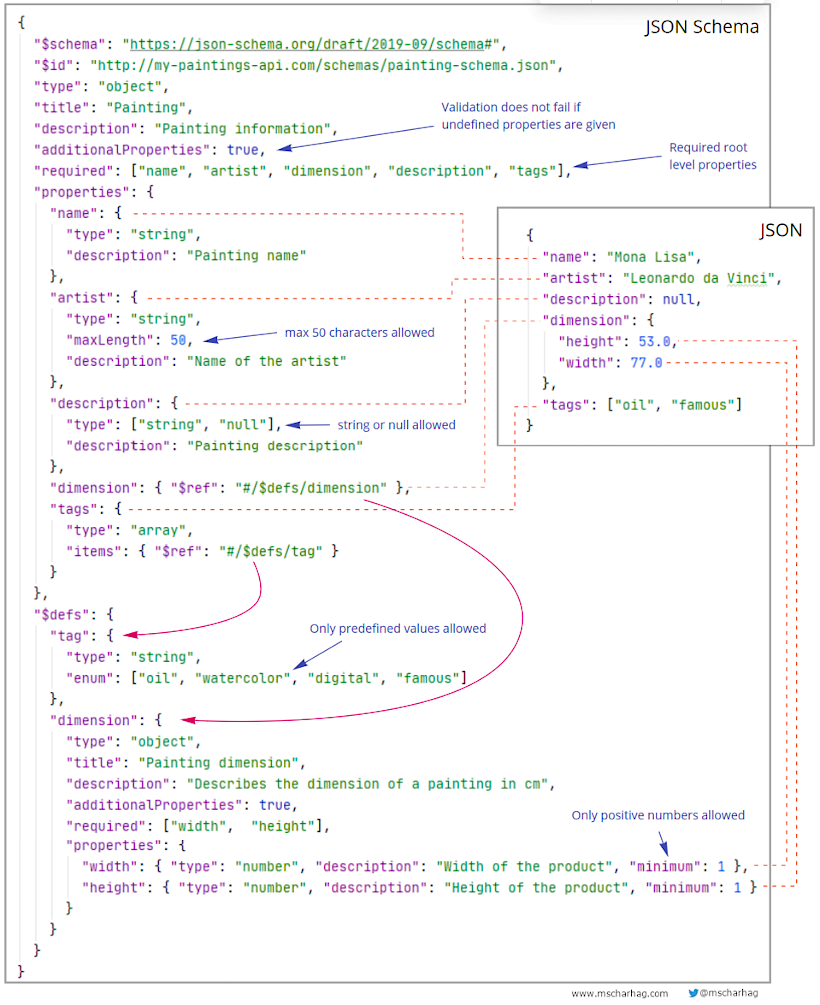
It’s commonly used to define the structure of:
- Request bodies (e.g., POST or PUT requests)
- Response bodies (e.g., GET requests)
- Query parameters and path parameters
JSON Schema is deeply integrated into specifications like OpenAPI (formerly Swagger), where it forms the backbone for describing the data models that APIs operate on. The benefits for APIs are manifold:
- Shared Contract: It acts as a definitive agreement between API providers and consumers (front-end developers, mobile app developers, third-party integrators). Everyone knows exactly what data to expect.
- Automated Documentation: Schemas can be used to automatically generate interactive API documentation, making it easier for developers to understand and use your API.
- Validation at Gateways: API gateways can leverage JSON Schemas to automatically validate incoming requests and outgoing responses, enforcing the API contract at the edge of your system.
6.2 Other Use Cases
Beyond APIs, JSON Schema is invaluable in numerous other scenarios:
- Configuration Files: Validating application configuration files (often in JSON format) before they are loaded can prevent startup errors and ensure that critical settings are correctly provided.
- Message Queues & Event Payloads: When services communicate asynchronously via message brokers (like Kafka, RabbitMQ, or cloud-native solutions), JSON Schema ensures that the event payloads exchanged between producers and consumers conform to expected formats, preventing integration failures.
- Form Validation: You can use the same schema definition for both client-side (JavaScript) and server-side validation, ensuring absolute consistency and preventing errors before data even reaches your backend.
- Data Interchange: Facilitating reliable data exchange between different internal systems, microservices, or with external partners becomes much simpler and more robust when data structures are clearly defined and validated.
How to Use JSON Schema for Validation
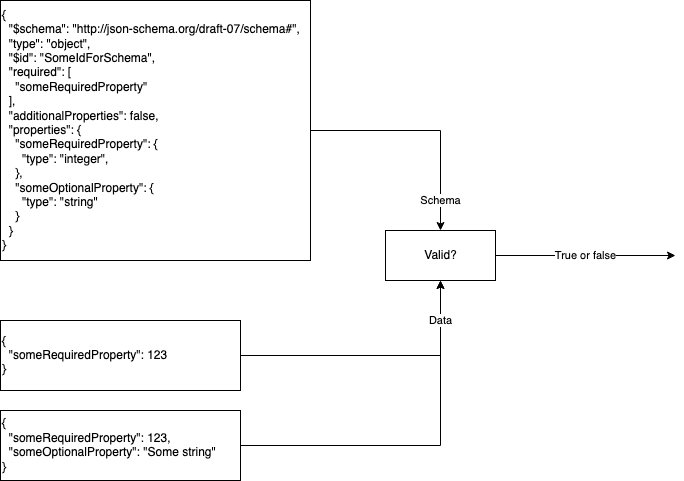
The process of using JSON Schema for data validation typically follows a straightforward workflow:
-
Define the Schema: Create a
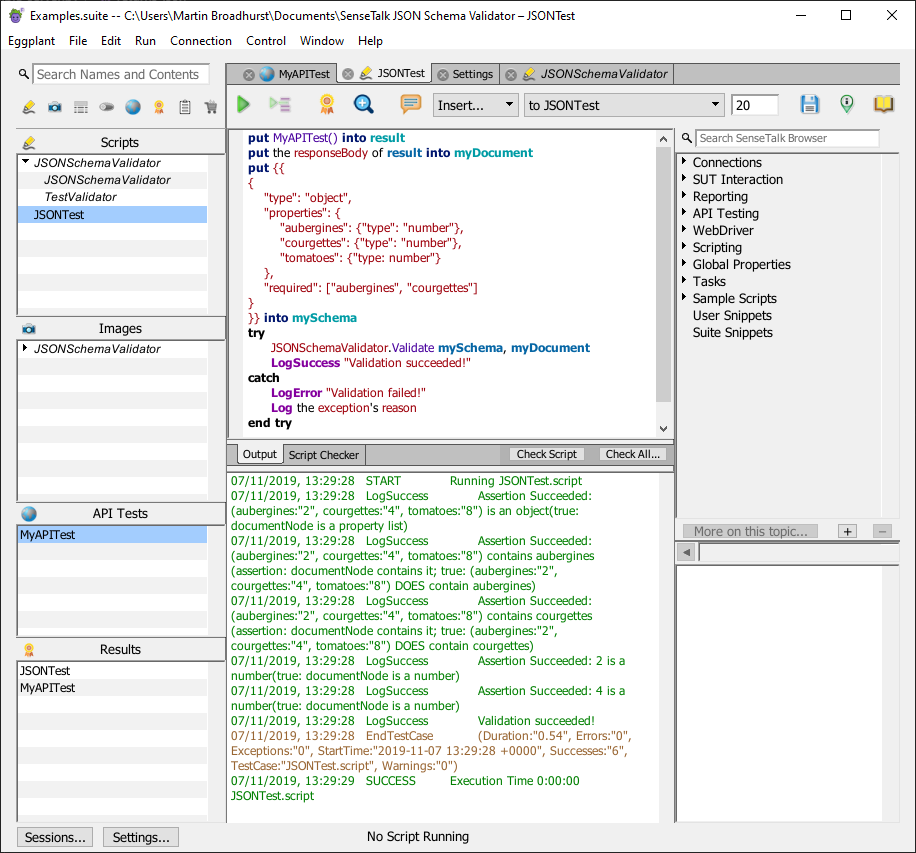
schema definition(a JSON Schema document) that accurately describes the expected structure and constraints of your JSON data. This is the blueprint. - Choose a Validator: Select a JSON Schema validation library or tool compatible with your programming language or environment.
- Validate: Pass both the JSON data instance you want to check and your JSON Schema to the validator.
- Interpret Results: The validator will return a result indicating whether the data is valid according to the schema. If it’s invalid, it will provide specific error messages detailing exactly where and why the data failed validation.

Popular Validation Tools:
- JavaScript/Node.js: Ajv (Another JSON Schema Validator) is a highly popular, fast, and standards-compliant library. (Source: betterjsonviewer.com, learnjsonschema.com)
- Python: The
jsonschemalibrary is the standard choice for Python developers. - Java: Several libraries are available, such as
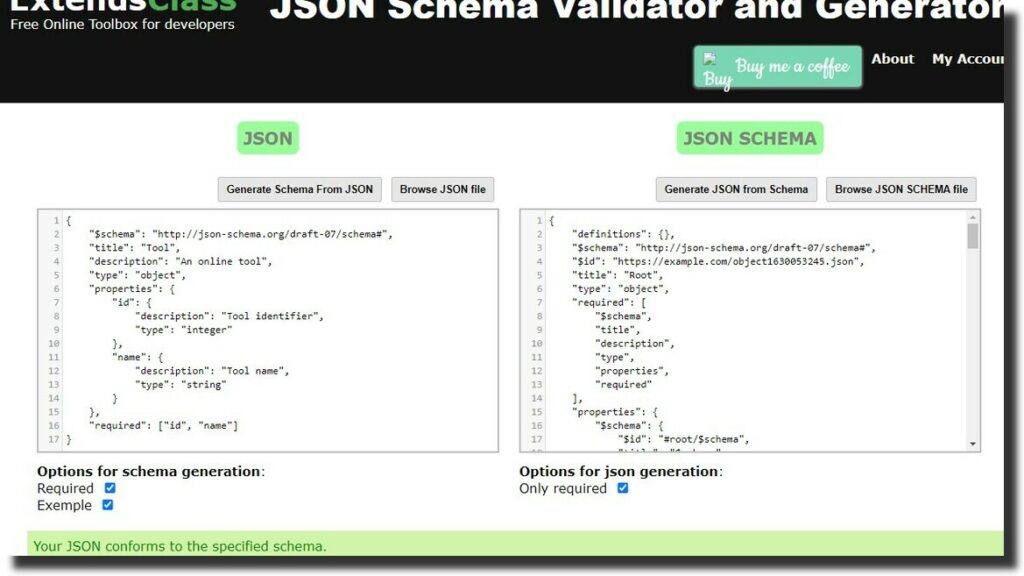
everit-json-schemaor thenetworknt/json-schema-validator. (Source: baeldung.com) - Online Validators: For quick testing, learning, or debugging, numerous websites offer online JSON Schema validators. These are excellent resources for experimenting. (Source: apidog.com, betterjsonviewer.com, json-schema.org)
Illustrative Example: Valid vs. Invalid Data
Let’s consider a JSON Schema for a product:
{
  "$schema": "https://json-schema.org/draft/2020-12/schema",
  "title": "Product",
  "description": "Schema for a product",
  "type": "object",
  "properties": {
    "id":      { "type": "string", "pattern": "^[a-f0-9]{8}-[a-f0-9]{4}-[a-f0-9]{4}-[a-f0-9]{4}-[a-f0-9]{12}$" },
    "name":    { "type": "string", "minLength": 1 },
    "price":   { "type": "number", "minimum": 0 },
    "inStock": { "type": "boolean" }
  },
  "required": ["id", "name", "price"]
}
Here is a valid JSON instance that conforms to this schema:
{
  "id": "f47ac10b-58cc-4372-a567-0e02b2c3d479",
  "name": "Wireless Mouse",
  "price": 25.99,
  "inStock": true
}
This data is valid because:
- It contains all the
requiredfields:id,name, andprice. - The
idmatches the UUID pattern. nameis a non-empty string.priceis a number greater than or equal to 0.inStockis a boolean, and while not required, its presence is valid.
Now, consider this invalid JSON instance:
{
  "name": "Mechanical Keyboard",
  "price": -10.00
}
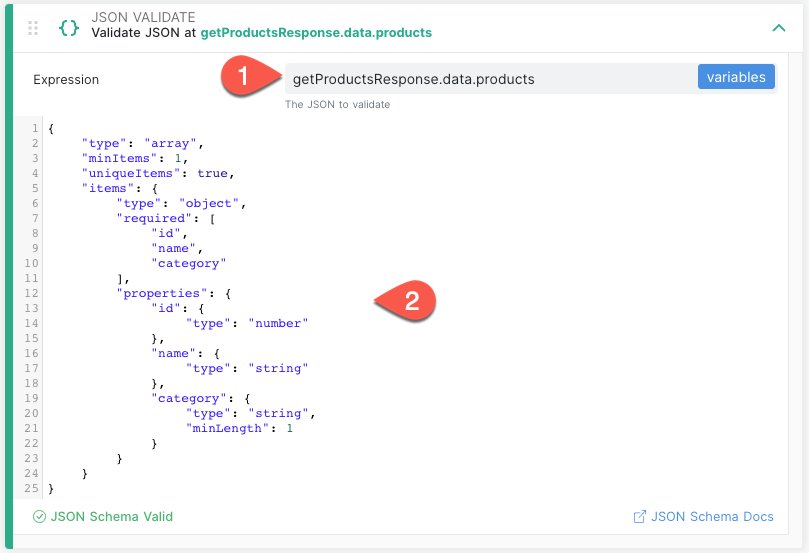
This data fails validation for the following reasons:
- Error: Missing required property ‘id’. The
idfield is listed in the schema’srequiredarray but is absent here. - Error: The price -10.00 is less than the minimum value of 0. The
priceproperty violates theminimum: 0constraint.
The inStock field is missing, but that’s okay because it’s not listed in the required array.
This section vividly demonstrates how validation errors pinpoint specific problems, making debugging significantly easier and faster. It highlights the power of having a clear schema definition for your data.
Advanced Concepts (Optional Section)
While the core concepts cover most use cases, JSON Schema offers advanced features for more complex validation scenarios. These can be particularly useful for intricate data structures and nuanced business rules.
- Logical Combinators: Keywords like
oneOf,anyOf,allOf, andnotallow you to combine multiple schemas to define sophisticated validation logic. For example, a field might need to satisfyallOfa set of constraints, or it could be valid if it meetsanyOfseveral different schema definitions, or preciselyoneOfthem. (Source: json-schema.org, learnjsonschema.com) - Conditional Validation: Keywords like
dependentRequiredanddependentSchemasenable conditional logic within your schemas. For instance, you can specify that if a particular property (e.g.,shippingAddress) is present, then another property (e.g.,shippingPostalCode) also becomes required. - Custom Formats: While JSON Schema provides standard formats (like
email,date-time), validators can often be extended to support custom formats. This allows you to define and validate specific patterns for things like internal IDs, custom code formats, or proprietary data structures beyond the standard set.

These advanced topics can significantly enhance the expressiveness of your schemas, but they also increase complexity. They might warrant a dedicated, in-depth follow-up post for thorough exploration.
In summary, JSON Schema is the standardized language for describing and validating JSON data. Its importance cannot be overstated in ensuring data quality, enhancing the reliability of API schemas, and streamlining the overall developer experience. By providing a clear, machine-readable contract for data, JSON Schema helps prevent errors, clarifies expectations, and builds more robust applications.
“JSON Schema provides a standard way to describe and validate JSON data.” (Source: apidog.com, json-schema.org, learnjsonschema.com)
We encourage you to put these concepts into practice! Try defining a schema definition for a JSON payload you work with regularly—perhaps an API response you frequently encounter. Utilize an online validator or a library like Ajv or jsonschema to test your newfound schema. For further learning, the official JSON Schema resources are excellent starting points. (Source: json-schema.org, json-schema.org, json-schema.org, learnjsonschema.com)

What’s the first JSON payload you’ll try to define a schema for? Share your experiences or any surprising validation challenges in the comments below!