Google Project Jarvis and the Future of Autonomous AI Computing

Estimated reading time: 10 minutes
Key Takeaways
- Google Project Jarvis is an ambitious research prototype for an autonomous AI agent that can operate on your computer.
- Unlike reactive voice assistants, this AI observes, plans, and executes multi-step tasks across your browser and apps.
- Early versions are expected to appear as a Google autonomous computing assistant in 2025, likely through Chrome and Google Workspace.
- The system promises to redefine productivity by handling email triage, form filling, data extraction, and personal admin.
- Privacy, permissions, and safety controls will be critical as this technology moves from prototype to product.
Table of contents
- Google Project Jarvis and the Future of Autonomous AI Computing
- Key Takeaways
- Introduction: The Shift to Proactive AI Agents
- What Is Project Jarvis? Defining the Google AI Agent
- How Google Jarvis AI Manages Computing Tasks Autonomously
- Everyday Productivity Redefined – The Google AI Agent for Everyday Tasks
- What to Expect – The Google Autonomous Computing Assistant in 2025
- The Bigger Picture – How Autonomous AI Changes the Way We Work
- Frequently Asked Questions
Introduction: The Shift to Proactive AI Agents
AI is evolving from passive, reactive tools to proactive digital agents that can perceive, understand, and act on your behalf. At the center of this shift is Google Project Jarvis autonomous AI computing—an ambitious effort to turn your everyday computer into an environment where an AI agent can work alongside you, and sometimes for you.

This isn’t about smarter search engines or better voice assistants. It’s about a fundamental leap: moving from “waiting for input” to “acting on your behalf.” In this article, we will answer the core questions: What is Project Jarvis? How does it work? And how will it change daily work starting in 2025 and beyond? For a broader look at the AI tools and trends driving this shift, you might explore our analysis of Google Project Jarvis AI Browser Assistant.
What Is Project Jarvis? Defining the Google AI Agent
Let’s start with the core question: what is Project Jarvis Google AI? Project Jarvis is a research prototype from Google exploring how an AI system can understand what’s happening on your screen, reason about your goals and tasks, and take actions across apps, browser tabs, and web pages on your behalf.

This fundamentally distinguishes it from traditional assistants. Simple voice assistants like Siri or Alexa are reactive—they respond only when you speak to them. Project Jarvis is designed to be a true software agent. It doesn’t just answer questions; it executes multi-step tasks. This evolution is part of a larger trend discussed in our guide on Agentic AI Trends 2025.
Key capabilities of this agent include:
- Observing context (what you’re doing, what’s open on your screen).
- Planning multi-step actions to achieve a goal.
- Executing those actions inside your existing tools (email, browser, applications).
This is the essence of Google Project Jarvis autonomous AI computing: turning your computer into an environment where AI can operate as a co-worker, not just a chatbot.
How Google Jarvis AI Manages Computing Tasks Autonomously
So how does Google Jarvis AI manage computing tasks in practice? The core mechanism is that the AI has controlled, permission-based visibility into the user’s digital workspace. With your explicit consent, it can perform several critical functions.
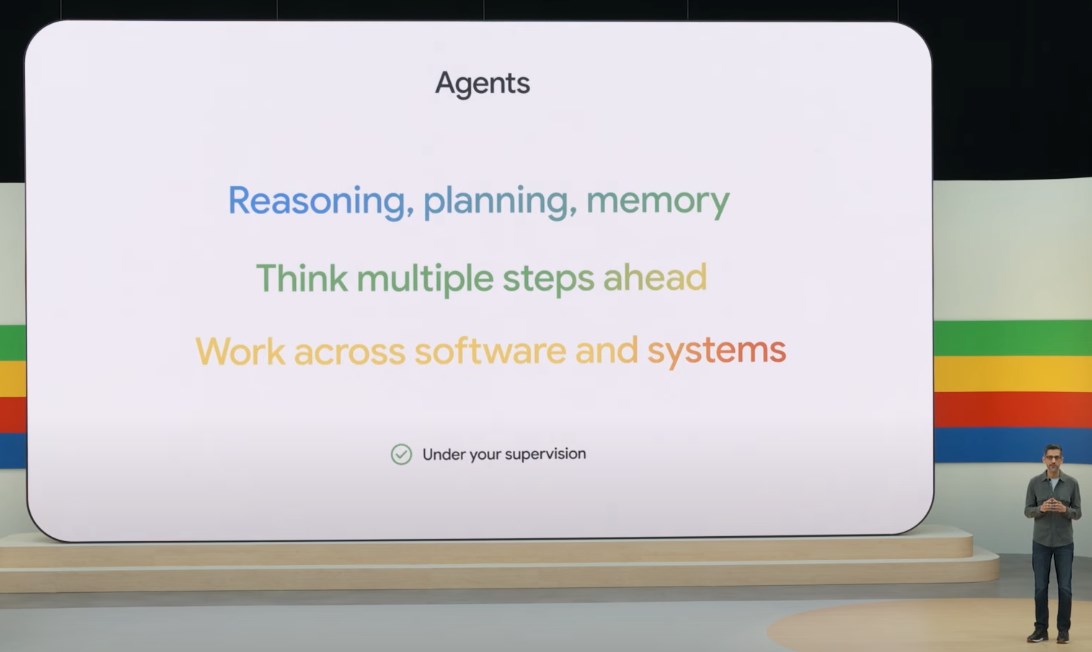
First, it can capture and analyze screen activity, understanding what’s on the page, what fields are present, what buttons exist, and what steps are needed to complete a task. Second, it can interpret high-level instructions, understanding commands like “Book my usual flight to New York next Friday.” Third, it can plan and execute multi-step workflows, breaking requests into individual actions like navigate, fill, copy, and save.
Concrete examples of how this works include:
- Filling forms automatically: The AI reads a PDF, extracts information like name, address, and invoice number, and fills a web form with that data.
- Extracting and structuring data: It scans a web page or spreadsheet, pulls key data points, and saves them into a clean, organized table.
- Booking appointments or travel: The agent opens your calendar, finds available time slots, navigates booking sites, and proposes options for your review.
- Organizing files: It reviews folders, groups related files, renames them based on patterns, and moves them into structured directories.
This is not just a smarter search box. This is an AI agent that observes, understands, and executes. The ability to perform these autonomous actions is what makes this a powerful example of Autonomous AI Agents in action.
Everyday Productivity Redefined – The Google AI Agent for Everyday Tasks
When we consider Project Jarvis as a Google AI agent for everyday tasks, the value proposition for the end-user becomes clear. This system is designed to handle the repetitive, time-consuming activities that drain your focus and energy every day.

Specific, relatable use cases include:
- Email triage: The agent can summarize lengthy threads, highlight critical deadlines, draft responses based on your past communication style, and sort incoming messages into priority buckets.
- Document summarization: It can read long reports, surface key points, combine information from multiple sources, and extract action items directly into your task manager.
- Repetitive browsing: Tasks like logging into portals, downloading routine reports, or filling out similar forms across different websites can be fully automated.
- Personal admin: Updating profiles across various services, tracking order statuses, and maintaining expense logs from receipts become effortless.
It’s important to contrast this with current tools. Macros and “if this then that” scripts require manual setup and break when website layouts change. This AI adapts to different layouts, understands language and context, and doesn’t require you to script every step manually. This capability to manage complex, multi-step workflows is a key feature of the Future of AI Agents in Work.
What to Expect – The Google Autonomous Computing Assistant in 2025
Looking ahead, many observers expect early versions of this system to appear as a Google autonomous computing assistant 2025. The likely forms of integration are becoming clearer.

First, it could launch as a Chrome extension or browser feature, allowing it to interact with web pages, forms, and tabs directly. Second, expect deep integration with Google Workspace, including Gmail, Docs, Sheets, Calendar, and Drive. Third, there is potential for cross-device functionality, coordinating tasks seamlessly across your desktop, laptop, and mobile phone.
However, the critical topic of privacy, permissions, and safety cannot be overlooked. Google will need to implement:
- Explicit opt-in controls: Granular permissions for what the AI can see and do on your device.
- Visible, transparent actions: Logs or summaries of everything the AI did on your behalf.
- Strong security: Guardrails to prevent unauthorized or harmful actions.
- Clear “stop” and override controls: The ability to pause, limit, or veto any action the AI takes.
Balancing autonomy with safety is the defining challenge for bringing the Google autonomous computing assistant 2025 to market. This balance is a critical topic in the ongoing debate about AI Regulation and Ethics.
The Bigger Picture – How Autonomous AI Changes the Way We Work
Zooming out, Google Project Jarvis autonomous AI computing is part of a larger shift in how we think about interacting with technology. We are moving from managing “apps and files” to simply stating “goals and outcomes.” Instead of clicking through menus, you will say things like “Prepare a summary of this quarter’s sales” or “Clean up my inbox and archive anything older than 30 days.”

The implications for different groups are significant. For remote workers and knowledge professionals, this reduces administrative overhead, helps maintain focus, and handles interruptions so you can stay in deep work. For small business owners, it automates tasks like invoicing, receipt management, and customer communication without needing dedicated administrative staff.
In the competitive landscape, Project Jarvis faces notable rivals. Microsoft Copilot is strong within the Microsoft ecosystem (Windows, Office, enterprise environments). Apple Intelligence focuses on privacy-preserving, on-device AI for native Apple apps. Google’s advantage is its web-first, cross-site autonomy, leveraging Chrome’s ubiquity, search context, and large AI models. This could make it an “operating layer” on top of the entire modern web. For a look at how another major player is approaching this space, check out our detailed analysis of Microsoft Copilot’s Integration.

As Google Project Jarvis autonomous AI computing moves from prototype to product, the way we work will change—from clicking every step to stating goals and letting an AI agent handle the rest.
Frequently Asked Questions
What is Google Project Jarvis?
Google Project Jarvis is a research prototype for an autonomous AI agent that can observe your computer screen, understand your goals, and execute multi-step tasks on your behalf across browser tabs and applications. It is a proactive, not reactive, system. For more details, see our guide on Google Project Jarvis AI Browser Assistant.
How does Google Jarvis AI manage computing tasks?
It manages tasks by capturing permission-based visibility into your digital workspace, interpreting high-level instructions, planning multi-step workflows, and executing actions like form filling, data extraction, file organization, and booking appointments automatically.
When will the Google autonomous computing assistant be available?
Early versions are expected to appear as a Google autonomous computing assistant 2025. It will likely launch as a Chrome extension or browser feature with deep integration into Google Workspace.
How is Project Jarvis different from existing voice assistants like Siri or Alexa?
Voice assistants are reactive—they only respond when you speak to them. Project Jarvis is a true agent that observes your screen, plans actions, and executes complex, multi-step tasks autonomously without requiring step-by-step commands.
What are the privacy and safety controls for this AI agent?
Google will need to implement explicit opt-in permissions, transparent action logs, strong security guardrails, and clear override controls. Users will have the ability to pause, limit, or veto any action the AI takes. This is part of the broader discussion on AI Regulation and Ethics.
Will Project Jarvis work with non-Google applications?
Yes, because it is designed to be web-first and cross-site. It can interact with web pages, forms, and portals from any website through your browser, making it an “operating layer” on top of the modern web.
What tasks can the Google AI agent for everyday tasks automate?
It can automate email triage, document summarization, repetitive browsing, form filling, data extraction, travel booking, file organization, personal admin like profile updates and expense tracking, and much more.
How does Project Jarvis compare to Microsoft Copilot?
Microsoft Copilot is strong within the Microsoft ecosystem (Windows, Office, enterprise). Project Jarvis leverages Google’s web-first approach, Chrome browser context, and large AI models to operate across any website. For a detailed comparison, read our analysis of Microsoft Copilot’s Integration.